Salesforce
Installing the Salesforce App
To enable this integration, you must have permission to install apps in your Salesforce account.
Go to the Integrations page — this link takes you straight to the Salesforce connection flow. Click Connect to get started.

A screen will appear prompting you to install the Salesforce app in your workspace. Click "OK" to continue.
Required Salesforce Profile
Important: The Salesforce user who connects Syft must be able to authorize the connected app and (for automatic custom-field setup) manage metadata. Use one of:
Option 1: Use Existing Profile
- System Administrator profile
Option 2: Create Custom Profile
If you don't have System Administrator access, create a new profile by:
- Clone the Standard User profile
- Add these Administrative Permissions:
- Modify All Data
- Customize Application
- Manage Profiles and Permission Sets
Without these permissions, Syft will not be able to create and sync custom properties automatically. For the full OAuth scope list, object access, custom fields, and read/write behavior, see Security, permissions, and data access.
Exporting data to Salesforce
Syft can export account and visitor-level data to Account, Lead, and Contact records. There are a couple of options that control what is automatically exported:
-
Update existing Accounts and Leads: When enabled, this option enriches your existing Account and Lead records with behavioral data. Syft creates custom fields with the
Syft…__cAPI name pattern (see Custom fields Syft creates and Exported Fields). This option is enabled by default.
-
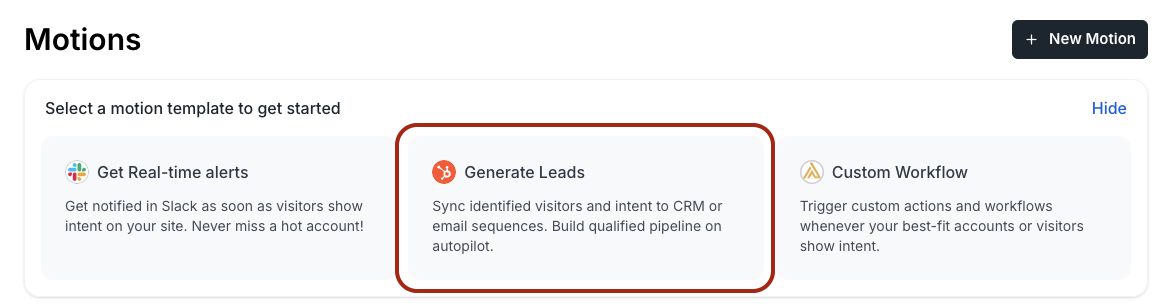
Create new Leads for identified visitors: Enable this option by creating a CRM motion.
Pipeline Stage
Syft computes a Pipeline Stage for each account based on opportunity data from Salesforce. Use this stage to qualify and prioritize accounts for human review, or to trigger Motion automations. The stage is evaluated in priority order:
| Stage | Condition |
|---|---|
| Customer | Account type is "Customer", or any opportunity is marked as won |
| Opportunity | Any opportunity is still open (not closed) |
| Lost Opportunity | All opportunities are closed |
| Prospect | Account exists in Salesforce |
Security, permissions, and data access
This section describes exactly how Syft uses Salesforce: which OAuth scopes and profile permissions are required, which custom fields Syft creates, and what Syft reads and writes. Share it with your security or IT team when reviewing the integration.
OAuth scopes Syft requests
When you click Connect, Syft starts Salesforce’s OAuth 2.0 web server flow against your org’s login host (production, sandbox, or a configured My Domain host). The authorize request asks for these scopes (Salesforce UI label, then scope value):
| Salesforce label | Scope value | Why Syft requests it |
|---|---|---|
| Manage user data via APIs | api | REST and SOAP calls against Account, Contact, Lead, Opportunity, User, Profile, and related Metadata / Tooling APIs |
| Access the Salesforce API Platform | sfap_api | Access to Salesforce API Platform endpoints used by the connected app configuration |
| Access the identity URL service | id | Identity / userinfo for the connecting user (org and user identifiers) |
| Perform requests at any time | refresh_token | Long-lived refresh token so Syft can sync without re-prompting the user |
| Full access | full | Broad access equivalent to the connecting user’s permissions (covers REST, Metadata, and Chatter Connect calls Syft makes) |
| Access unique user identifiers | openid | OpenID Connect identity token alongside the access token |
All of the scopes above are requested at connect time (baseline). Syft does not request additional scopes later for individual features.
Official Salesforce references:
Profile and object permissions
OAuth scopes alone are not enough: Salesforce still enforces the connecting user’s profile (and any permission sets).
| Permission / access | Baseline or feature-specific | Used for |
|---|---|---|
| Ability to install / authorize connected apps | Baseline | Completing the OAuth connect flow |
| System Administrator, or administrative permissions Modify All Data, Customize Application, and Manage Profiles and Permission Sets | Feature-specific: automatic custom-field setup | Creating Syft custom fields via the Metadata API and assigning field-level security on the connecting user’s profile |
| Read (and typically edit) on Account, Contact, Lead | Baseline for CRM sync | Matching, enriching, creating, and updating CRM records |
| Read on Opportunity | Baseline for pipeline stage | Computing Syft Pipeline Stage from opportunity win/loss/open state |
Read on User / Profile (and Tooling Profile.FullName) | Feature-specific: custom-field setup | Resolving the connecting user’s profile so Syft can set field-level security |
| Chatter / feed write on Account, Contact, and Lead feeds | Feature-specific: session timeline posts | Posting FeedItems via the Chatter Connect API when motions enable timeline notes |
If automatic field setup fails with a permissions warning, reconnect with a System Administrator (or the custom profile above), then re-run field sync from Integrations.
Salesforce references:
Custom fields Syft creates
On first successful connect (and when field mappings change), Syft upserts custom fields on Account, Contact, and Lead through the Metadata API (upsertMetadata on CustomField). Only API names ending in __c are created.
- Labels for Syft-owned properties use the
Syft - …prefix (for example,Syft - Matched Signals). - Default API names follow the
Syft…__cpattern (for example,SyftIntents__c,SyftCreationTrigger__c). The authoritative customer-facing inventory is in Exported Fields below; orgs can also map additional destination keys in Sync Properties. - After fields are created or updated, Syft sets field-level security on the connecting user’s profile so each new field is readable and editable (
readable=true,editable=truevia MetadataupdateMetadataon that Profile). Syft does not automatically grant FLS to every profile in the org—share those fields with other profiles via Salesforce Setup if needed.
What Syft reads
Syft reverse-syncs Salesforce data into Syft so accounts, people, owners, and pipeline stage stay current. Reads use the REST query API (/services/data/v59.0/query/).
| Object | Fields Syft queries (baseline) | Product flow |
|---|---|---|
| Account | Id, Name, LastModifiedDate, Website; owner sync also reads OwnerId, Owner.Email, Owner.Name | Match companies by website/name; sync account owners into Syft |
| Contact | AccountId, Id, Name, Title, Email, OwnerId, Owner.Name, CreatedDate, LastActivityDate, LastModifiedDate, MailingCity, MailingState, MailingCountry | Reverse-sync contacts for matching and enrichment |
| Lead | Id, Name, Title, Email, OwnerId, Owner.Name, Status, CreatedDate, LastActivityDate, LastModifiedDate, City, State, Country | Reverse-sync leads for matching and enrichment |
| Opportunity | Id, CloseDate, Type, IsClosed, IsWon, LastModifiedDate, AccountId | Compute Pipeline Stage |
| User / Profile | Connecting user’s ProfileId / Profile.Name; Tooling FullName for that profile | Custom-field setup and FLS assignment |
| EntityDefinition / field metadata | Field API names, types, labels | Detect existing custom fields before create/update |
If your org marks certain fields unreadable for the integration user, Syft strips those columns from SOQL (via org sfUnreadableFields settings) rather than failing the whole sync.
What Syft writes
Syft writes only when export settings or Motions call for it. Writes use the REST sObject API and, for buffered updates, the Composite SObject Collections API.
| Operation | API | Objects / fields | Product flow |
|---|---|---|---|
| Create record | POST /sobjects/Account (also Contact, Lead) | Standard create fields (Name/Website, Email/Name/Title/Address, Company, etc.) plus mapped Syft __c fields | “Create new Leads…” motions; creating Accounts/Contacts when configured |
| Update single record | `PATCH /sobjects/Account | Contact | Lead/Id` |
| Batch update | PATCH /composite/sobjects/ with allOrNone: false | Same mapped fields on existing Account, Contact, or Lead Ids | Buffered enrichment (“Update existing Accounts and Leads”); batches up to 200 records |
| Upsert custom field definitions | Metadata SOAP upsertMetadata | Account.*__c, Contact.*__c, Lead.*__c | Automatic custom property setup |
| Set field-level security | Metadata SOAP updateMetadata on Profile | FLS readable + editable for those fields on the connecting profile | After custom fields are created |
| Chatter timeline (optional) | POST /chatter/feed-elements (FeedItem) | Posts on Account / Contact / Lead feeds | Motions that attach a Syft session timeline to the CRM record |
Syft does not delete Salesforce records. Create vs update behavior for each mapped field is controlled by the field’s sync trigger (CREATE, UPDATE, or ANY)—see Exported Fields.
Salesforce references: