HubSpot
Syft connects your website activity to HubSpot. It identifies the companies and people visiting your site, scores their intent and fit against your ideal customer profile (ICP), and writes the results to HubSpot:
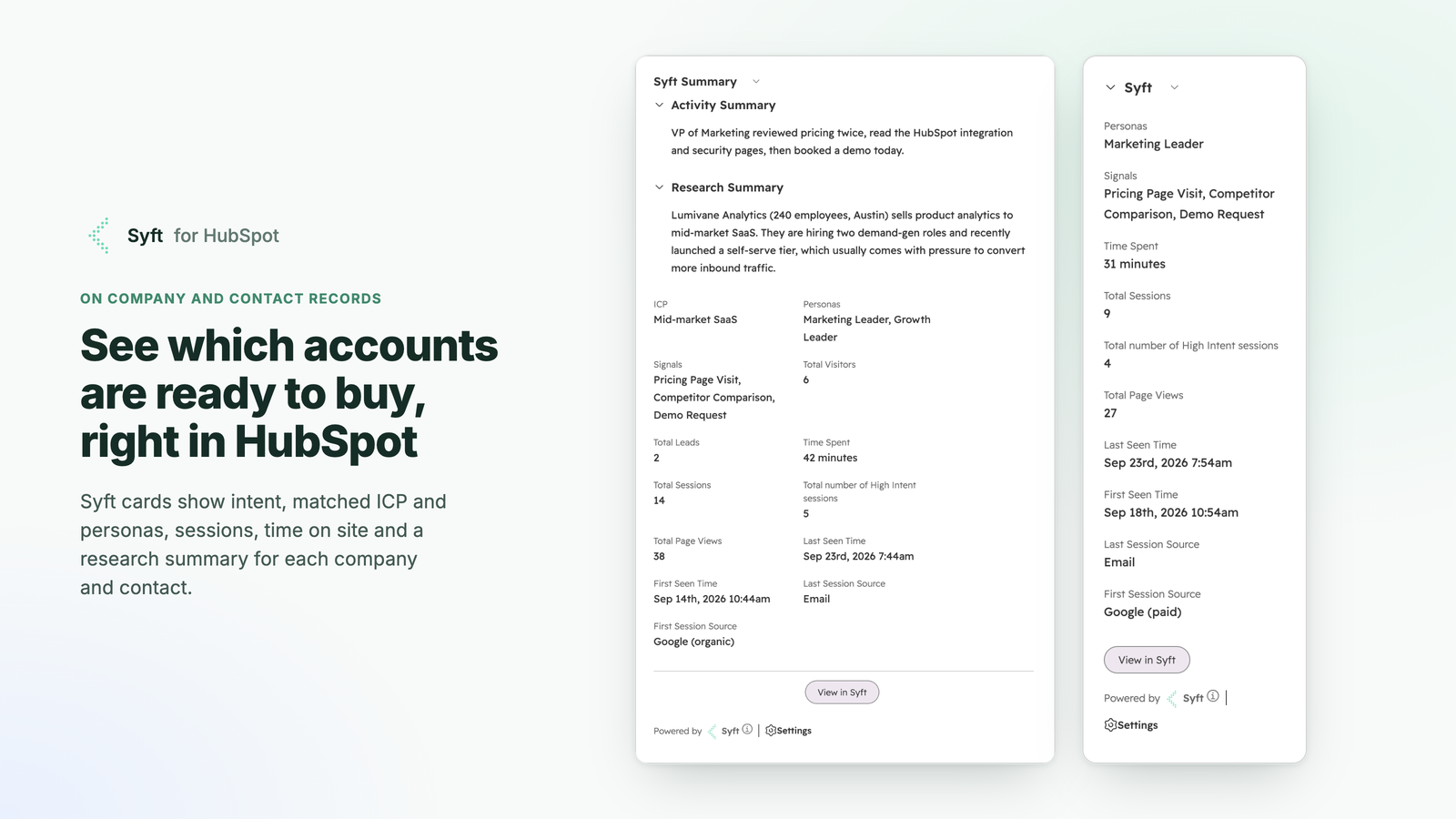
- Record cards show a company's or contact's Syft intent, ICP fit and recent website sessions on its HubSpot record.
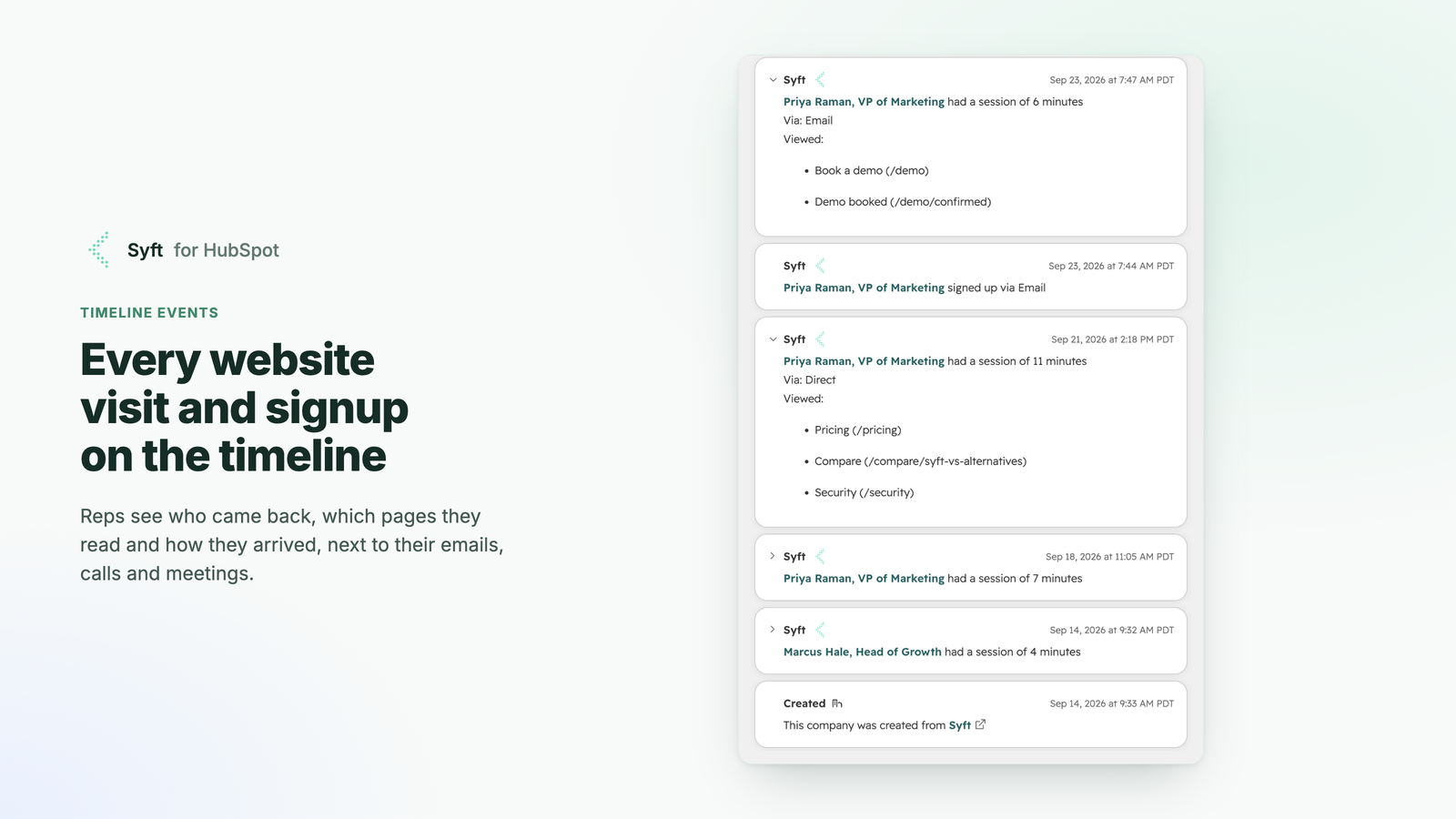
- Timeline events add website visits and signups to the company and contact timeline.
- Syft properties add intent, engagement and firmographic fields to your Company and Contact records, for use in views, reports, lists and workflows.
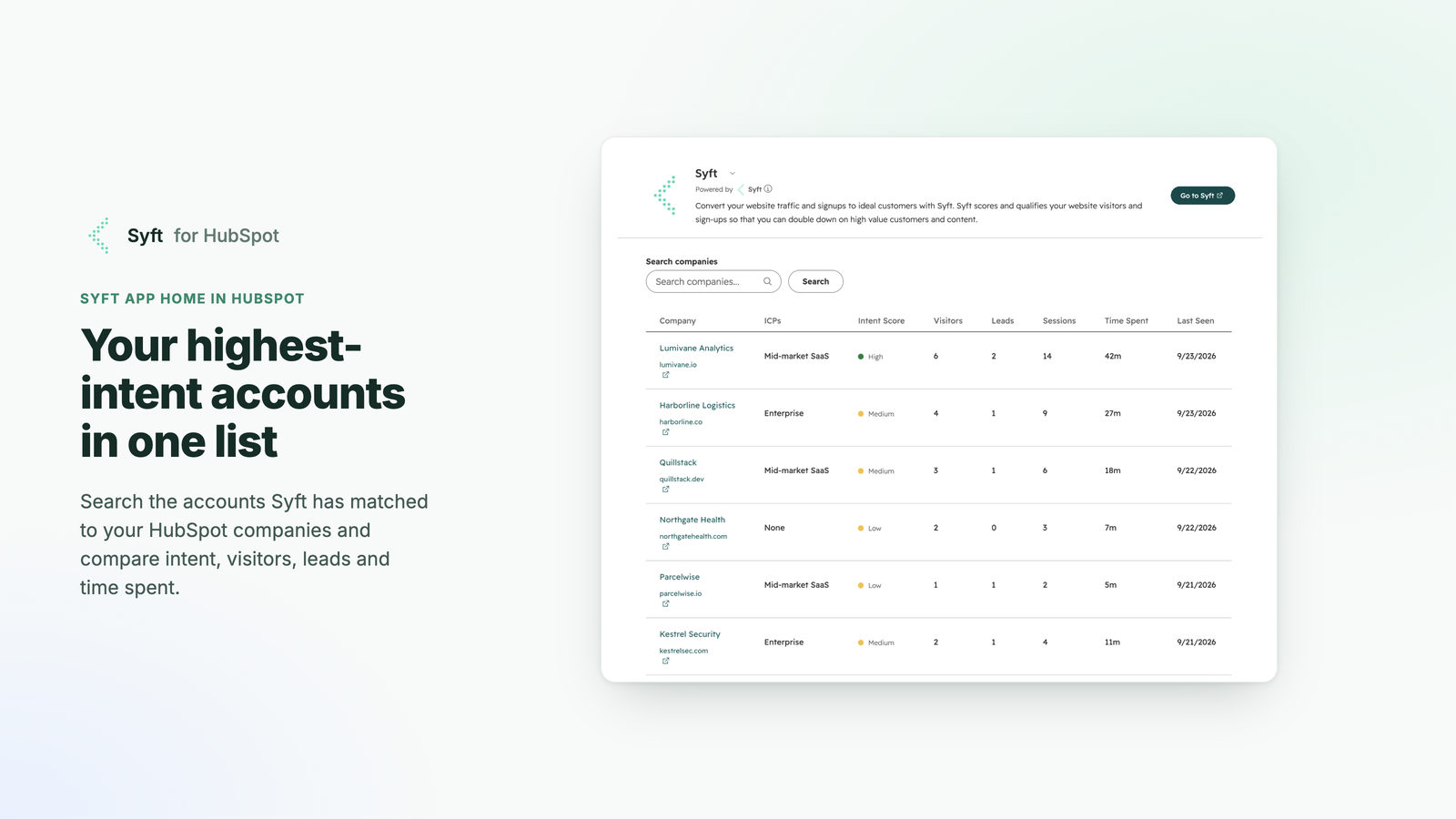
- App home ranks the accounts showing the most intent, inside HubSpot.
- Lists and motions use HubSpot lists as Syft target accounts or motion triggers, and let Syft motions create records and add them to lists.
Before you begin
- A Syft workspace. Sign up at app.syftdata.com and install the Syft tag on your website (for example with Google Tag Manager) so Syft has activity to send.
- HubSpot permissions. To install apps you need to be a Super Admin in HubSpot or have the App Marketplace Access permission.
- HubSpot subscription. Syft doesn't require a particular HubSpot subscription. To trigger workflows from Syft properties, you need a HubSpot plan that includes workflows.
Install the app
You can start the install from Syft or from the HubSpot App Marketplace. Either way, you approve the same permissions and finish setup in Syft.
From Syft
-
In Syft, go to Settings > Integrations and click Connect on the HubSpot card.

-
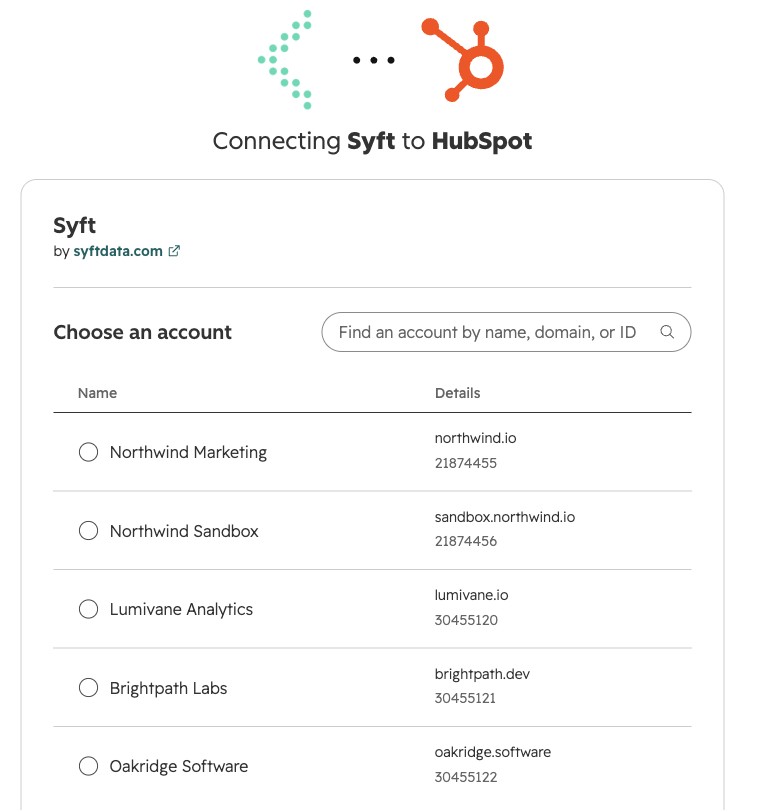
HubSpot opens in a new window. If you have access to more than one HubSpot account, pick the account to connect Syft to and click Choose Account.
-
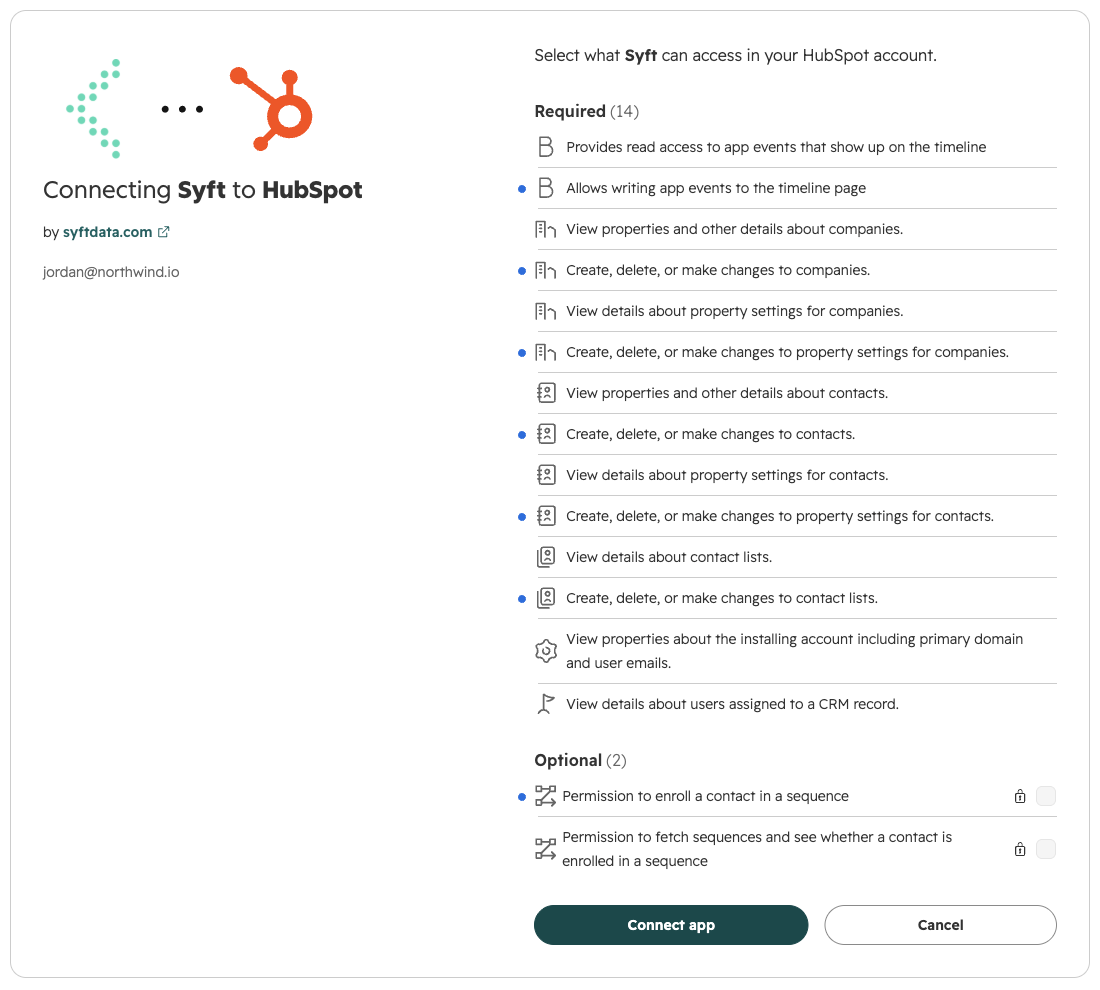
Review the permissions Syft requests. Permissions Syft requests explains each one. The two sequence permissions under Optional are only needed to enroll contacts in HubSpot sequences from a Syft motion, so leave them unticked if you don't. Click Connect app.
-
HubSpot sends you back to Syft to configure the app.
From the HubSpot App Marketplace
- In HubSpot, click the Marketplace icon in the top navigation and search for Syft, or open Syft's listing directly.
- Click Install. Choose your HubSpot account and approve the permissions, as in steps 2 and 3 above.
- HubSpot sends you to Syft. Sign in, or create a Syft workspace if you don't have one yet, and continue with the configuration below.
Configure the app
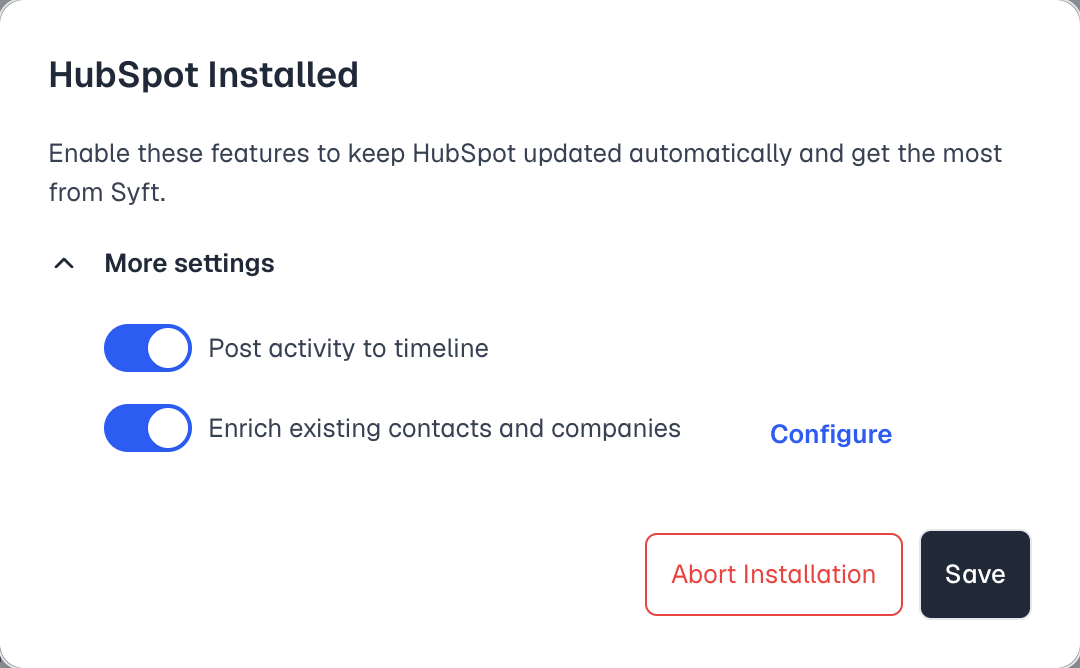
After you approve the permissions, Syft shows the HubSpot Installed dialog:
-
Choose what Syft keeps up to date in HubSpot. Both options are on by default:
- Post activity to timeline adds website visits and signups to the timeline of matching companies and contacts.
- Enrich existing contacts and companies writes Syft properties to Company and Contact records that already exist in HubSpot. Click Configure to review the field mapping (see Exported Fields).
-
Click Save. Syft creates its properties in your HubSpot account and starts syncing. Abort Installation disconnects HubSpot instead, without creating anything.
-
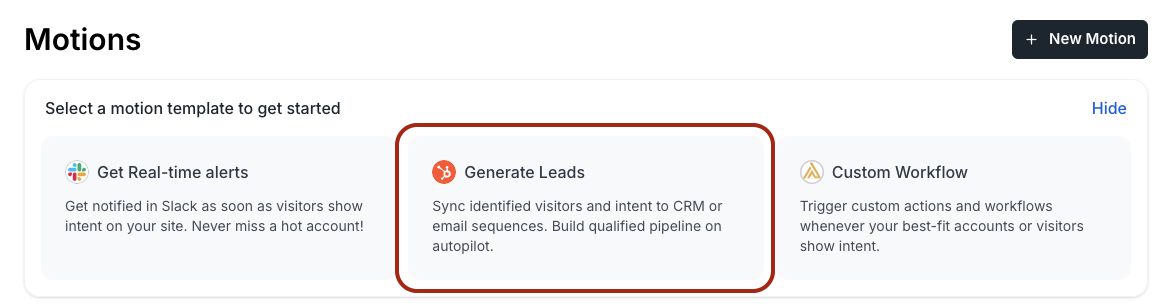
Optional: to have Syft create companies and contacts for identified visitors, or add them to a HubSpot list, create a CRM motion. The motion's filters decide which visitors qualify, for example by ICP match or intent.
-
Optional: add the Syft cards to your record pages. In HubSpot, open a company or contact record and customize it to add these cards:
- Syft Summary (a middle-column tab);
- Syft Summary in Sidebar (right sidebar);
- Syft Leads (companies only).
HubSpot explains how in customizing record pages.
To change these settings later, go to Settings > Integrations in Syft and click Configure Sync on the HubSpot card.
Use the app
Once you're connected, Syft works in the background and data flows to HubSpot without any action on your part.
What happens automatically
| What | When |
|---|---|
| Syft properties on matching companies and contacts are updated | When Syft identifies the visitor or company, and again as their activity and intent change |
| Website visits and signups are posted to the company and contact timeline | When Syft processes the session |
| HubSpot lists used as Syft target account lists are refreshed | Every hour |
| Motions triggered by a HubSpot list check for new list members | Every 5 minutes |
| New companies and contacts are created, or added to a list | When a visitor matches a CRM motion you set up |
Syft matches existing records by company domain and contact email before creating anything, so it enriches your existing records rather than duplicating them.
Record cards
Open a company or contact to see its Syft intent and ICP fit, key engagement metrics, and recent website sessions with the pages viewed. On a company, the Syft Leads card lists the people from that company Syft has identified.
Timeline events
Website visits and signups appear on the company and contact timeline, next to your emails, calls and meetings. Each visit shows how long the session lasted, the channel it came from, and the pages viewed.
App home
App home shows the accounts with the most intent, ranked, each linked to its HubSpot record. To open it, go to Settings > Integrations > Connected Apps in HubSpot, click Actions next to Syft, then Go to app home.
Syft properties, lists and workflows
Syft properties work like any other HubSpot property. Their internal names start with syft_ and their labels with "Syft - ". Use them to:
- filter views;
- build active lists, for example companies whose Syft intent is High;
- create reports;
- trigger HubSpot workflows.
The full list is under Exported Fields.
Disconnect the app
-
In Syft, go to Settings > Integrations.
-
On the HubSpot card, click Disconnect and confirm.
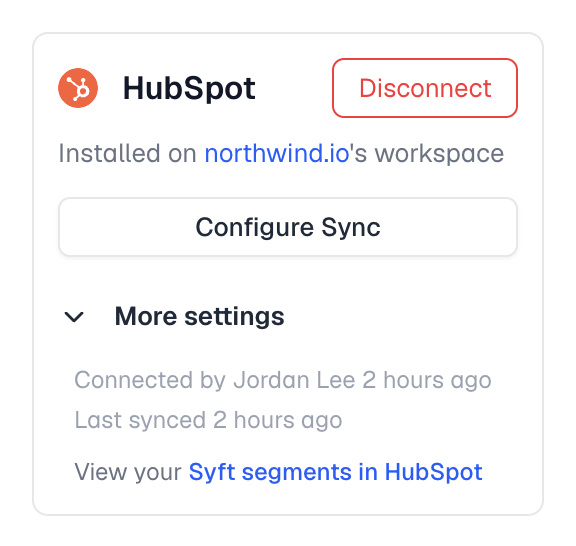
When you disconnect:
-
Syft stops sending data to HubSpot, turns off motions that use HubSpot, revokes its access, and uninstalls the app from your HubSpot account.
-
Your HubSpot data is not deleted. These all stay in HubSpot:
- companies and contacts Syft created;
- the Syft properties and the values already written to them;
- timeline events;
- list memberships.
If you no longer need the Syft properties, you can delete them from Settings > Properties in HubSpot.
-
Your Syft workspace and its data are unaffected. You can reconnect at any time from the same page.
Uninstall the app
You can also remove Syft from within HubSpot:
-
In HubSpot, click the Settings icon and go to Integrations > Connected Apps.
-
Find Syft, click Actions, then Uninstall, and confirm.
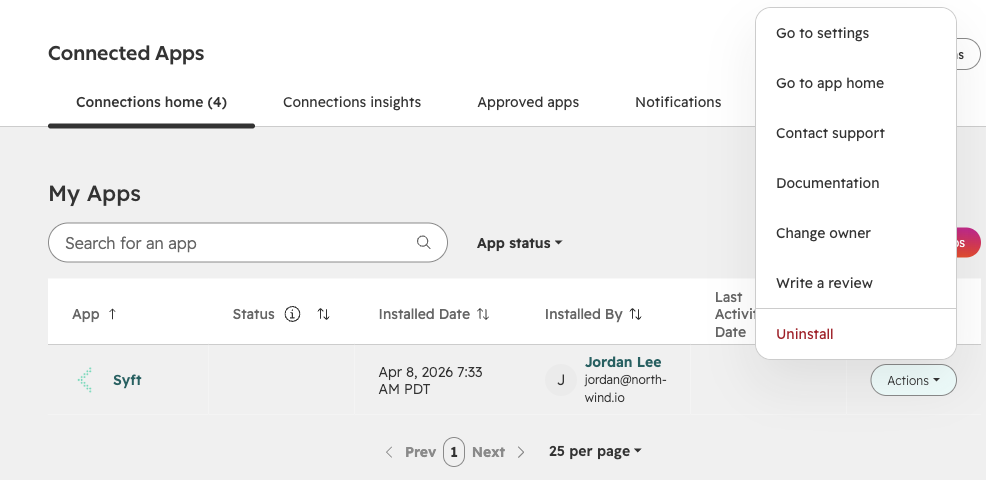
Uninstalling has the same effect as disconnecting from Syft: Syft stops sending data, and the records, properties, values and timeline events already in HubSpot remain. For details, see HubSpot's guide to uninstalling an app.
Need help? Email support@syftdata.com.
Permissions Syft requests
| Permission | Why Syft needs it |
|---|---|
crm.objects.companies.read, crm.objects.companies.write | Find matching companies, create companies from your motions, and write Syft fields to them. |
crm.objects.contacts.read, crm.objects.contacts.write | Find matching contacts, create contacts from your motions, associate contacts with their company, and write Syft fields to them. |
crm.schemas.companies.read, crm.schemas.companies.write, crm.schemas.contacts.read, crm.schemas.contacts.write | Create and maintain the Syft properties listed under Exported Fields. |
crm.objects.owners.read | Show each record's HubSpot owner in Syft. |
crm.lists.read, crm.lists.write | Use HubSpot lists as target account lists and motion triggers, and add records to lists from a motion. |
timeline.read, timeline.write | Post website visits and signups to the company and contact timeline. |
oauth | Standard HubSpot OAuth scope for connected apps. |
automation.sequences.read, automation.sequences.enrollments.write (optional) | Enroll contacts in a HubSpot sequence from a motion. Only needed if you use that step. |
Marketing Contacts
HubSpot distinguishes between marketing contacts and non-marketing contacts. Marketing contacts can receive marketing emails and count toward your billing tier, while non-marketing contacts cannot receive marketing emails.
By default, HubSpot creates contacts from integrations and APIs as non-marketing contacts. This means contacts created by Syft will initially be non-marketing contacts. If you plan to send marketing emails to these contacts, you'll need to enable marketing contacts for the Syft integration.
Enabling Marketing Contacts for Syft
To have future contacts from Syft created as marketing contacts:
- Go to Settings in your HubSpot account
- Navigate to Integrations > Marketing Contacts
- Find Syft in the list of connected apps
- Turn ON the toggle to enable marketing contacts
Only contacts created after enabling this setting will be marked as marketing contacts. Existing contacts created before the change will remain non-marketing.
Updating Existing Contacts
To update contacts that were created before enabling the marketing contacts setting:
- Bulk update: Select contacts from the Contacts index page and use the bulk action to set them as marketing contacts.
- Workflow automation: Create a workflow to automatically set contacts as marketing contacts based on specific criteria (requires Professional or Enterprise plan).
For more details, see the HubSpot documentation on marketing contacts.
Pipeline Stage
Syft computes a Pipeline Stage for each company based on deal data from HubSpot. Use this stage to qualify and prioritize accounts for human review, or to trigger Motion automations. The stage is evaluated in priority order:
| Stage | Condition |
|---|---|
| Customer | HubSpot lifecycle stage is "customer", or the company has a recent closed deal date |
| Opportunity | Company has associated deals and at least one open deal |
| Lost Opportunity | Company has associated deals but no open deals |
| Prospect | Company exists in HubSpot |
Exported Fields
Company Object
Contact Object
When Syft creates these properties
Syft creates its properties when you finish connecting HubSpot (the Save step above). They stay in your HubSpot account if you disconnect Syft, along with the values already written to them.
Coverage is scoped to your field mapping
Syft syncs only the fields in your configured mapping — the lists above are the defaults. If you have customized the company or contact mapping for your workspace, that saved mapping wins.
This matters when you are checking whether enrichment "worked":
- A field that is absent from the mapping is intentionally not synced. That is configuration, not a failed sync.
- Each mapped field also carries a trigger:
CREATEwrites the value only when Syft first creates the record,UPDATEonly on subsequent updates, andANYon both. ACREATE-only field will not appear on records that already existed in HubSpot before you connected Syft. - A record only receives values at all if it passed the filters on the motion that syncs it.
So if a value you expected is missing, check in this order: is the field in your mapping, what is its trigger, and did the record actually match the motion.
Frequently Asked Questions
Does Syft create duplicate contacts in HubSpot?
No. Syft matches existing records by email address and company domain before creating new entries. Existing records are enriched rather than duplicated.
What HubSpot permissions does Syft need?
See Permissions Syft requests for every scope and what it is used for. You authorize them during the OAuth connection flow.
How often does Syft sync with HubSpot?
Data syncs in real-time. When a visitor is identified or a company shows intent signals, the corresponding HubSpot record is updated immediately.
Can I control which contacts are created in HubSpot?
Yes. Use CRM Motions to define filters (ICP match, intent score, engagement level) that determine which visitors become HubSpot contacts.
What fields does Syft add to HubSpot?
Syft adds properties whose internal names start with syft_ (labeled "Syft - …"), including intent scores, page views, last visit date, ICP match status, and firmographic data. See the Exported Fields section above for the complete list.
How do I confirm we are enriching the right records?
Start with the Exported Fields section above and the coverage note beneath it — most surprises are a field that is not in the mapping, or one mapped CREATE-only landing on a record that already existed.
To check a specific record, open the account or contact in Syft and compare it against the HubSpot record. To review which visitors qualify for the sync at all, open the CRM motion and check its filters.
For a per-record coverage report across your whole workspace, ask us in your Syft Slack channel — that is not something you can pull from the dashboard today.
How do I disconnect or uninstall Syft?
See Disconnect the app and Uninstall the app. Either way, the records, Syft properties and values already in HubSpot stay there.